ONE NOTE

Rage, rage against the dying of the light.

ipv6特点

  • 使用64位为网络号,64位为主机号替代ipv4的子网掩码+可变网络标识设计。
  • 全球分配ip时,前48位为全球路由前缀分配给组织,目前已经分配的全球路由前缀的前3bit均为001(以2000::/3打头),剩下的16位用于组织构建子网

临时ipv6地址

临时地址的地址是随机生成的,主要作用是对外通讯使用,他最大的优点就是没有暴露本机mac地址。因为linux和mac系统在默认下是使用EUI-64来生成IPv6地址,而windows是默认随机生成(其实都可以改)

EUI-64

IEEE定义的一种从48位mac地址转化为64位ipv6主机id的规范

具体做法为:

  • 在mac中间插入FFFE
  • 第一个字节的第七位取反

正因为上面的性质,ipv6地址可能暴露mac地址,windows访问外部使用随机生成的id避免暴露mac地址。

如何关闭临时ipv6地址

https://www.cnblogs.com/LandWind/p/ipv6-disable-enable.html

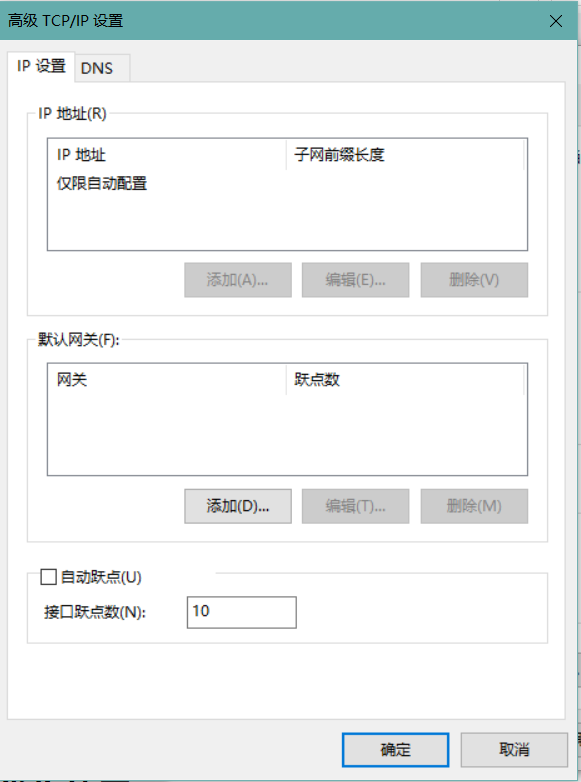
修改跃点数实现ipv6优先使用

windows不修改ipv6优先的话,有可能访问外部时,一直使用ipv4地址。

python ipv6 socket server demo

1
2
3
4
5
6
7
8
9
10
11
12
13
14
15
16
17
18
19
20
import socket

mySocket = socket.socket(socket.AF_INET6, socket.SOCK_STREAM)
host = ''
port = 80
mySocket.bind((host, port))
mySocket.listen(10)
print("开始监听")
while True:
client, address = mySocket.accept()
data = client.recv(1024)
print(data.decode("utf-8"))
# client.send("Here's Johnny!".encode("utf-8"))
client.send("""HTTP/1.1 302 Moved Temporarily
Server: bfe/1.0.8.18
Date: Wed, 07 Sep 2022 09:04:11 GMT
Content-Type: text/html
Connection: close
Location: https://baidu.com""".encode("utf-8"))
client.close()

想法

ipv4下,想获得公网ip是比较麻烦的,互联网在我看来,更像一种经过多层NAT更像一种只能向上的树结构。

ipv6下互联网真的变成一张网了,任意两个设备都可以连接(然而阿里云不给我分配ipv6,令人感叹)。

1
2
3
4
5
6
7
8
9
10
11
12
13
14
15
16
17
18
19
20
21
22
// ==UserScript==
// @name 必应搜索引擎优化
// @namespace https://tampermonkey.net/
// @version 1.0
// @description 屏蔽csdn
// @author hinak0
// @match https://cn.bing.com/*
// @icon https://www.google.com/s2/favicons?sz=64&domain=bing.com
// @grant none
// ==/UserScript==

(function () {
"use strict";
const resultList = document.querySelectorAll("main ol#b_results li.b_algo");
resultList.forEach((item) => {
let url = item.querySelector("cite").innerHTML;

if (url.indexOf("csdn") !== -1) {
item.innerHTML = "<strong>已屏蔽csdn</strong>";
}
});
})();

hash模式

使用hashchange事件监听地址栏变化,从而更新dom.

demo:

1
2
3
4
5
6
7
8
9
10
11
12
13
14
<!doctype html>
<div class="main">
<a href="#personal">personal</a><br />
<a href="#search">search</a><br />
</div>
<script>
let main = document.querySelector("div.main");
window.onhashchange = (e) => {
// 获取新的地址
let path = e.newURL;
// 更新dom
main.innerHTML = path;
};
</script>

history模式

  • 劫持跳转事件
  • 使用history.pushState实现更新地址栏

demo:

1
2
3
4
5
6
7
8
9
10
11
12
13
14
15
16
17
<!doctype html>
<div class="main"><a href="test.html">test.html</a><br /></div>
<script>
let main = document.querySelector("div.main");
main.addEventListener("click", (e) => {
if (e.target.nodeName === "A") {
// 阻止默认跳转行为
e.preventDefault();
// 获取地址
let path = e.target.href;
// 更新地址栏
window.history.pushState({}, "", path);
// 更新dom
main.innerHTML = `${path}`;
}
});
</script>

history模式下,跳转并不会真的发送请求,但是改变了地址栏,此时刷新会导致404错误。

所以后端要重定向所有的请求到索引页面,以nginx为例:

1
2
3
4
location / {
# 告诉nginx找不到资源时如何处理
try_files $uri $uri/ /index.html;
}

这样还有一个问题,跳转后刷新一个页面会导致回到首页,失去了路由的意义,所以要在页面刚加载时读取到地址栏信息,然后根据地址渲染页面。

history是什么

是从新建一个标签页开始,所有打开过的url的一个栈,浏览器根据这个维护 前进,后退 功能。

详细mdn文档https://developer.mozilla.org/zh-CN/docs/Web/API/History

案例

https://app.noy.asia/#/preview/4116

这个网站实现了一个流氓功能:后退的话,会向history中push一个state,导致无法退出这个页面——除非关掉这个标签页。

实现禁止后退功能

1
2
3
4
5
6
7
history.pushState(null, null, document.URL);
// 每当触发后退事件时,就再加一个当前页面的记录
window.addEventListener("popstate", (e) => {
alert("popstate");
history.pushState(null, null, document.URL);
console.log("you can't go back");
});

或者做绝一点,像这样:

1
2
3
for (let index = 0; index < 5; index++) {
history.pushState(null, null, document.URL);
}

如何屏蔽这种行为?

幸好,chrome已经有针对这种行为的应对策略了,经过测试,再进入一个标签页后,如果不进行任何操作,不会触发popstate事件,此举正是为了防范流氓网站。

但是其他浏览器比如via浏览器,并没有这个功能。

其他浏览器,如果你想做一个屏蔽流氓网站的插件,可以这么做:在刚刚进入页面时,通过Object.defineProperty()等方法来覆盖history对象的popstate方法,同时设置一个变量保存原本的方法,在用户做出交互行为后恢复popstate方法就好了。

结论:

  • 校园网是通过mac区分设备,进行认证的
  • 某个mac通过认证后,可以通过这个mac上网并且无需验证
  • 两台设备共享一个mac上网规避设备限制不现实

过程

要实现两台设备一个mac,可谓是大费周折。首先找来一块支持更换mac的网卡,修改mac发现修改有限制,只能修改为局域mac(类似于私有ip),而我的手机mac恰好是全局mac,而且安卓修改mac更困难。

在 Windows 下修改 MAC 地址时,为什么第 2 个十六进制字符只能是 2、6、A、E 之一?

后来想到手机也有随机mac的功能,于是想到可以使用随机mac认证一个mac,于是实现了两台设备相同mac。

局域网中,两台设备相同mac会发生什么

在以前的集线器时代,无非是网卡收到不是发送给自己的数据包,然后提交给操作系统——但是没有应用程序处理这些数据而已。

但在交换机的端口隔离下,局域网中相同mac的设备可能发生以下情况——自己的请求收不到应答(应答在隔壁呢)于是触发数据重传,导致网络拥堵不堪。

实际上确实如此,两台设备争抢资源非常严重,网速降至龟速,无法实现平分网速。

如果此时其中一台设备选择下线呢?

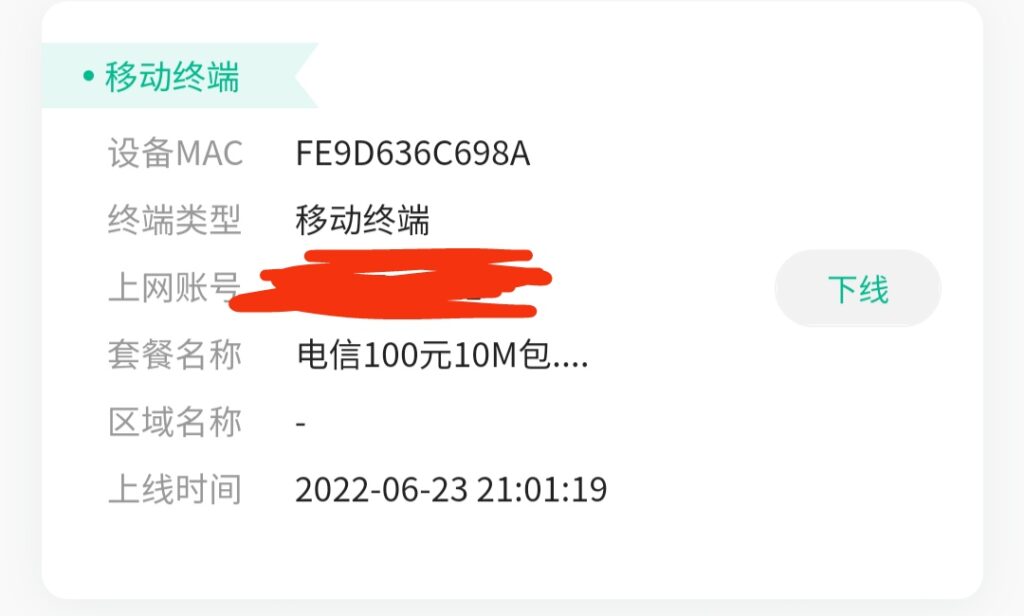
另一台设备可以正常上网。并且网关不会重新检测设备类型,可以实现绕过设备类型限制

如图,实际上现在是一台pc在正常上网。

下一步,打算利用mac认证整一个路由器分享校园网。

js可以通过在函数内部定义函数,实现开辟新的作用域,外部无法访问,也就是实现了私有变量。

1
2
3
4
5
6
7
8
9
10
11
12
13
14
15
16
17
18
19
20
21
22
23
24
25
26
27
28
29
30
31
32
33
34
35
36
37
38
39
40
41
42
43
44
45
46
47
48
49
50
51
52
53
54
55
56
57
58
59
60
61
62
63
64
65
66
67
68
69
70
71
72
73
74
"use strict";
var Clock = (function () {
let clock = {
now: new Date(),
hr: 0,
minu: 0,
sec: 0
}
// 初始化钟表对象
function init(el) {
clock.canvas = document.querySelector(el)
clock.ctx = clock.canvas.getContext('2d')
clock.canvas.width = clock.canvas.height = 400
clock.ctx.translate(clock.canvas.width / 2, clock.canvas.width / 2)
}
// 画指针的方法
function _pointer(length, width, base, num) {
clock.ctx.beginPath()
clock.ctx.moveTo(0, 0)
clock.ctx.lineTo(length * Math.sin(2 * Math.PI * num / base), -length * Math.cos(2 * Math.PI * num / base))
clock.ctx.lineWidth = width
clock.ctx.stroke()
}
function Hour(hr) {
_pointer(80, 5.5, 12, hr)
}
function Minu(minu) {
_pointer(110, 2.5, 60, minu)
}
function Sec(sec) {
_pointer(150, 1.5, 60, sec)
}
// 更新时间
function update() {
clock.now = new Date()
clock.hr = clock.now.getHours()
clock.minu = clock.now.getMinutes()
clock.sec = clock.now.getSeconds()

// 中点
clock.ctx.beginPath()
clock.ctx.arc(0, 0, 5, 0, 2 * Math.PI)
clock.ctx.fill()

// 表盘
clock.ctx.beginPath()
clock.ctx.arc(0, 0, 180, 0, 2 * Math.PI)
clock.ctx.lineWidth = "7"
clock.ctx.stroke()

// 画刻度
clock.ctx.beginPath()
for (let i = 0; i < 12; i++) {
let angle = Math.PI * i / 6
clock.ctx.moveTo(180 * Math.sin(angle), 180 * Math.cos(angle))
clock.ctx.lineTo(160 * Math.sin(angle), 160 * Math.cos(angle))
}
clock.ctx.lineWidth = "1.5"
clock.ctx.stroke()

// 执行函数
Hour(clock.hr)
Minu(clock.minu)
Sec(clock.sec)
}

// 循环动画
function loop() {
clock.ctx.clearRect(-1 / 2 * clock.canvas.width, -1 / 2 * clock.canvas.height, clock.canvas.width, clock.canvas.height)
update()
window.requestAnimationFrame(loop.bind(this));
}
return { init, loop }
})();

以上实现了一个canvas绘制钟表的模块,效果可见于deploy.hinak0.xyz

此模块内所有函数变量,外部均无法访问。

有以下几点注意:

  • 非严格模式下,在包内部使用name = "zhangsan"会使变量挂载到全局,严格模式则会报错(未定义的变量不允许使用)
  • 这种写法代码量比较大,因为使用每个属性时都要带上clock.key这种前缀,代码冗余很大,但是胜在全部变量在一个对象`clock`内部。
  • 可以使用严格模式+变量均在头部声明来简化代码。

1
2
3
4
5
6
7
8
9
10
11
12
13
14
15
16
17
18
19
20
21
22
23
24
25
26
27
28
29
30
31
32
33
34
35
36
37
38
39
40
41
42
43
44
45
46
47
48
49
50
51
52
53
54
55
56
57
58
59
60
61
62
63
64
65
66
67
68
69
<div class="pwGenBox">
<button onclick="generate()">生成密码</button>
<input id="hasSpec" type="checkbox" />
<p>特殊字符</p>
<h3 class="password"></h3>
<input class="input" style="opacity:0;position:absolute;top:-999px;" />
<button onclick="copy()">点击复制</button>
</div>
<script>
var input;
function copy() {
input.select();
document.execCommand("Copy");
}
function generate() {
let hasSpec = document.querySelector("#hasSpec").checked;
let len = 14;
str = randomStr(len, hasSpec);
let pwd = document.querySelector("h3.password");
input = document.querySelector("input.input");
input.value = str;
pwd.innerText = str;
}
function randomStr(len, hasSpec = false) {
let str = "";
while (str.length < len) {
switch (Math.floor(Math.random() * 4)) {
case 0:
str += num();
break;
case 1:
str += upper();
break;
case 2:
str += lower();
break;
case 3:
if (hasSpec) {
str += spec();
}
break;
default:
str += "?";
break;
}
}
return str;
}
function _randomASCII(start, span) {
return String.fromCharCode(Math.floor(Math.random() * span + start));
}
function upper() {
return _randomASCII(65, 26);
}
function lower() {
return _randomASCII(97, 26);
}
function num() {
return _randomASCII(48, 10);
}
function spec() {
return _randomASCII(33, 14);
}
</script>
<style>
.pwGenBox p {
display: inline-block;
}
</style>

input框如果设置为display:none会导致无法选中,可以选择移动到屏幕外/设置透明/被遮盖的方法掩藏,或者写一些css让input框代替展示文本。